03 December 2019
Times Have Changed
from the mind of
Perfect Virgo
7
remarks
11 March 2017
Audio Books
from the mind of
Perfect Virgo
5
remarks
13 January 2014
Family History in the techonolgical era.
Well this is a different slant on the family history quest and one which I couldn't have dreamed of back in the nineteen eighties. I can search British digital indexes from Charlottetown on my laptop and bring up probable matches over a half century span in mere seconds. A feat which would have taken days of scouring through handwritten ledgers. I can view streets, houses and faces, all from a great distance. It's even possible to submit a DNA swab and have my ancestry analysed. I could learn from which gene pool I come and I could potentially hook up with international fifteenth cousins.
It's cheap these days at $99, but the hidden price is that your result set includes medical traits and susceptibilities. Information which not everyone is ready for yet.
from the mind of
Perfect Virgo
0
remarks
16 April 2013
spring cleaning
My Dell XPS16 has been showing signs of age. It's four years old and still nicely spec'd but definitely suffering from too many files and programmes and not enough hard drive. I keep deleting my old restore points to create space.
from the mind of
Perfect Virgo
1 remarks
12 August 2011
OPPO BDP-93 Blu Ray and Universal Disc Player
I decided to branch into Blu Ray for certain films. Carrying 50gb of data per disc compared to a standard DVD’s 8.5gb, Blu Ray discs are able to provide significantly more detail for both picture and audio. We won’t see the best of our Hi-Definition TV unless we have a Hi-Def source so I researched players and settled on the Oppo.
I need a player that can handle Blu Ray, DVD, DVDR, CD, CDR, SACD and DVD Audio. Not only that but one which can read discs encoded for all geographical Regions and convert video from PAL to NTSC and vice versa. In short, a universal disc player that can play anything I own whether purchased in the UK or North America.
Oppo is a new American Manufacturer established in 2004 but already making a big name for itself with multi-functional disc players, upper mid-range in price but rivalling high-end competitors for performance. I bought the BDP-93 from an online retailer in Ohio for $630, $100 more than list price for the “region free” modification. Delivery took four days by FedEx. Packaging is the best I have seen; a large box with plenty of padding and the player wrapped in a strong linen bag. A separate box within contains cables, leads, wireless dongle and a chunky remote control with beautiful backlighting. I won’t delve into the technical detail of the BDP-93, suffice to say it has played anything I have thrown at it without fuss. The hefty owner’s manual is available online for the curious, as are detailed reviews.
From a user’s perspective, the Oppo’s upscaling of DVDs is great. My picture has never looked so sharp. Blu Rays are notoriously slow to boot up but this player reaches the menu within thirty seconds. So far I have only sampled a Blu Ray transfer of the thirty-five-year-old “Exorcist” but even that looks superbly defined with detail and illumination even in the dark corners.
As to sound quality, the player is amazing. I already own good players by NAD, Cambridge Audio and Toshiba but this beats them all by some distance. A universal disc player is all well and good but if you need an additional CD player to achieve quality audio then the point is lost. The Oppo gives the best audio experience I have had. Sound is full and crystal clear. I play it through a Yamaha ampilifier/receiver and Harmon Kardon surround sound speakers and the sound is truly detailed and powerful.
A potentially useful feature is the Oppo is wireless Internet ready and I had no trouble connecting it to my home network. Now a full range of online videos are available via the likes of YouTube and Netflix.
As a bonus you can leave an external hard drive plugged into either of the two USB ports and access any audio or video content using on-screen menus on the TV. My entire music collection is ripped to mp3 so unless I am looking for CD quality then I can call up from my armchair anything I fancy listening to. What’s more, the Oppo can read image files enabling you to watch slideshows of your digital photos on the big screen. All in all I’m quite happy with the purchase.
from the mind of
Perfect Virgo
2
remarks
08 June 2011
this is the modern world
In fewer than thirty years we have moved from the floppy disc to the Blu Ray disc and there has been little if any overlap. Nonetheless I thought about comparing the two media in the realm of films. I realise that graphics cards from twenty-five years ago could not support what we now consider to be “high definition” nor did even regular 1990’s processors have the power to deliver anything more than grainy, jerky video. Undaunted by anachronisms...
The storage capacity of a 3.5” floppy disc from the late 1980’s was a heady 1.4MB. It occurred to me that backing up a Hi-Definition feature film that way would require a barely credible 35,714 floppy discs (50GB). So an avid film buff would need approximately nineteen standard sized suitcases to store the discs for one film. He’d also need some manual dexterity because he’d have to feed the discs into a disc drive at the rate of five per second for the duration of a two hour film.
Or he could just use one dual-layer Blu Ray disc.
***
I hear a detachment of twenty-eight British Policemen are to be offered counselling before returning to regular duty after a gruelling seventy day special assignment next year. Gosh, these guys must be about to see some sickening, brutal things, witness some terrible, gruesome events... no, they are to accompany and guard the 2012 Olympic torch on its eight thousand mile celebratory parade around the British Isles.
***
Acknowledging Maisie on her trike, a walker in Victoria Park remarked in all seriousness, “That child needs a helmet!” Bear in mind Maisie was propelling the afore-mentioned vehicle at crawling speed on a wooden boardwalk. Frankly that grizzled old crone of about fifty might have benefited more from a helmet herself, bearing in mind her pace of perambulation must have been approaching 2.5mph.
I’m all for safety where appropriate but I believe the nanny state has gone too far in the molly-coddling stakes. And they have people believing their propaganda, people like the opinionated pedestrian above, a woman of the baby-boomer generation who lived through:
. babies sleeping on their tummies
. cars with no seatbelts or infant seats
. pregnant mothers smoking and drinking
. lead in paint
. no childproof caps on medicines
. and the list goes on and on and on ...
Perhaps we’ll get our toddlers helmets when they are actually threatening their heads.
from the mind of
Perfect Virgo
2
remarks
10 May 2011
sound and vision


from the mind of
Perfect Virgo
4
remarks
02 April 2011
vista internet security, fake a/v removal
On my Internet travels I picked up a pernicious virus. Vista Internet Security 2011 is a rogue virus posing as anti-virus software. Immediately following infection a fake Vista Security window appears and a "scan" appears to be taking place. In no time a list of Trojans, Worms and other wicked infections appears.
Instinctively you try to close the window when you twig that it's fake but it won't close. The infection results in no Internet connectivity. Whatever programmes you try to open fail to run and instead the fake scan starts up again.
I tried to open System Restore but got the message the 'execute' file for System Restore could not be found. Heck this is serious. I held down the power switch and turned the laptop off.
Fortunately I found a back door. Michelle has a profile set up on my laptop so I rebooted and logged on as her. I found the infection had only hit my own profile so I was able to use System Restore and roll the laptop back to the previous day. I logged on as me again and found my profile clear and unaffected.
This virus has apparently been doing the rounds for a couple of years and has a number of names, all referencing Internet security and all directing you ultimately to a site where you can buy software guaranteed to remove the infection. There is no removal software and there is no genuine infection in the first place. The whole thing is a dirty scam. Many 'tech' websites are listing umpteen adjustments you can make to your Registry to eliminate the infection but none mentions System Restore, presumably because the virus itself disables it.
It's worth bearing in mind my backdoor method. A second profile on the same hard drive will be unaffected allowing access to System Restore, certainly a safer method than fiddling with Registry Keys.
from the mind of
Perfect Virgo
3
remarks
25 March 2011
printer frustration
I seem to be collecting printers. All the same model. I now have three Epson Artisan 725 printer/scanner/copiers... temporarily.
I wanted a new printer capable of producing top quality photographs. Initially I bought an Epson NX510 at Future Shop but that went back when its images were generously supplied with dark horizontal lines. No amount of head cleaning or realignment would stop this. I've had three very good Epsons over the past decade so decided to persevere and climbed the range to the afore-mentioned Artisan after some research.
I got a good price from B&H Photo in New York and a large box was promptly delivered three days later. Exciting stuff! Except that this model too produced unsightly horizontal lines until I used the highest quality settings. The results are great but it is officially now the slowest printer I have owned, despite advertising to the contrary.
After three weeks the printer stopped picking up paper. It clicked, rattled and shook and generally tried its hardest but the paper wouldn't feed. During a thorough inspection I discovered that the CD tray wouldn't descend either. There's a little tray which is supposed to glide out at the touch of a button allowing a CD to be drawn into the innards for direct printing.
By now I'm cross.
The Epson help line is conveniently located three time zones away on the west coast of America. After consulting world maps and time charts I calculated the correct calling time and spoke to a representative. After the usual efforts to identify an easy solution she gave up and announced a "new" one would be with me in the post. Excellent, and what's more there would be a pre-paid shipping label to send the faulty one back.
The "new" one arrived the very next day but my excitement soon evaporated. The box was marked 'refurbished' and had ominous damage to one corner - as if it had been dropped from a fair height. Sure enough, when I opened up the package I found a panel had sprung off the underside of the unit, not a repairable thing. To make matters worse the refurbished unit had clearly seen some action. It was scuffed and scratched and was leaking ink through the new hole in the bottom.
I wasted no time in calculating Pacific Time before grabbing the phone and stabbing the Epson numbers in. Another very helpful and apologetic rep listened to the sad story. I told him even if this refurbished unit had been in working order I would have been heavily down on the deal as the one I am sending back is, outwardly at least, in pristine condition. I want a brand new replacement.
This required the approval of his superiors. It took three minutes to arrange that but he came back on the line all chuckles and reassurance.
Yesterday our FedEx deliveryman came with yet another large box and a face loaded with deja vu. So... now I have three. I spent a while setting the latest one up because I cocked up the wireless settings at first. Uninstall failed but System Restore did the trick and I started again. Hooray, we're up and running.
All that remains now is for me to drive two thirty-five pound boxes to the FedEx office to get them out of my sight!
from the mind of
Perfect Virgo
3
remarks
20 February 2011
borrowing DVDs, permanently
Make copies! Not for broadcasting or sharing of course but to allow you that little extra time to view them in. Oh, and it’s useful to have the set handy in case you want to watch it again, right? But DVDs are usually between 6GB and 8GB in size whereas a blank DVD-R holds a mere 4.7GB. What to do? Are we thwarted? Not on your Nelly!
Squeezing lots of video data onto a small disc is certainly possible but you have to shrink the file. I have an interest in solving technology challenges and this is the copying method I have developed. The freely downloadable software DVD Shrink is a good place to start. It compresses the data during copying to ensure it will fit comfortably on any commercially available blank DVD. It’s easiest to choose to rip the disc as an ISO image file.
But to back up for a moment (pardon the pun), it is a good idea to clean the discs thoroughly first. In the case of well-worn discs, deep scratches will be unreadable by a computer drive so you may as well give up at this stage and save yourself the hassle. But light scratching, which will be bothersome to a computer drive, can be polished down sufficiently using a car body scratch remover – the kind that will gently buff away surface scratching.
Sometimes no matter what you do, the disc may be impossible for your drive to read, it may be badly pitted. Or perhaps you want to rip a ‘Region 2’ disc in your ‘Region 1’ drive. Try DVD Decrypter. That has more powerful features, will crack regional encoding and seems less fussy. Europe is Region 2, North America is Region 1 but DVD Decrypter will render the copied image region-free. However, the ripped file you end up with this way will still be far too big, so you will need to reduce the ISO file size in DVD Shrink. Earlier we shrunk an actual DVD but this time you will need to “mount” the ISO file on a virtual drive. Magic ISO will achieve this by treating the ISO file as a playable DVD and will allocate a virtual drive letter to it.
When you’ve at last got an ISO file on your hard drive coming in at just under 4.7GB then you’re ready for the easy bit, the burning. I use Nero or Roxio but any burning software will put the ISO image file onto a blank DVD. I find DVD-R discs are readable by most DVD players. I don’t notice an appreciable loss of quality even though the copied image is considerably smaller than the original.
After all that effort you’re ready to watch. Slip into your old slippers, light your pipe and relax in your favourite armchair... and don’t forget to take the DVD back to the library, you don't want a late fee do you!
from the mind of
Perfect Virgo
2
remarks
16 February 2011
making new music
I returned from England a couple of weeks ago with, among many things, a great deal of new music. It came in the form of mp3 and wma files stashed on my external hard drive. This trove came from a friend I visited in Birmingham. He lives in a ninety room mansion but curiously confines himself to a single suite positively brimming with CDs and vinyl.
He and I have exchanged music for years. To sidestep any legal difficulties I prefer to think of it as storing backup copies for personal use (three thousand miles away). Luckily for me he has other friends who are equally acquisitive on the music front and are just as keen to keep copies somewhere safe and sound. This arrangement makes for a vast reservoir of music into which I can occasionally dip.
Usually these exchanges take place under plain brown cover through trans-Atlantic correspondence but this time, after two flights and a two hundred mile drive up the M5, we could hook up USB-wise in person and plunder each other's external hard drives with abandon. The result of this debauchery was a horde of around ninety albums. Plus of course an interesting and entertaining couple of days during my three week trip back to England.
Extreme Virgo tendencies won't ever let me leave it at that. Oh no, the harvest was just the beginning. Now the online work would begin in earnest. First a quick sampling to identify candidates for burning to CDR, then a tidying up of "tags" to be sure all tracks are properly labelled with title, band, album, genre and year. Next comes the job of burning to CDR, a big task but worth it for those albums which I will want to hear on my hi-fi.
Temporary labels adorn the pile of discs at this stage while the printing phase swings into action. This is a time consuming but vital part of the exercise if the CDRs are to be protected for storage on my shelves. Google Images is a happy hunting ground for the cover art and sites like Amazon provide track-listings which I can either copy and paste or transcribe. I paste the images and data one by one into an MS Word template I made many moons ago. Each gets printed on white cardstock.
Next out comes the guillotine and I do some trimming. I've done this so often now that I can slip the card in out and bring down the guillotine arm almost before the card has stopped moving. Swivel it round ninety degrees and slice off the excess, repeat twice more then cut around the folding tabs. Folding each tab is a long process with a batch this size but makes the gluing stage easier.
The tabs are brushed with a glue stick then the whole template is folded into its final shape, a slim CD-sized sleeve. While the seams dry I start on labels for the discs. These I form from a homemade template in DesignPro Lite. I keep the labelling simple just band, album title and year. I pick a background colour to match the cover art and print off the labels, two to a sheet.
I apply the self-adhesive labels with a trusty Fellowes labelling device which emigrated from England with me years ago. Finally I slip each CD into its new case and there it is, a stack of music to play on the hi-fi.
from the mind of
Perfect Virgo
6
remarks
08 February 2011
the Realplayer Video download phenomenon
from the mind of
Perfect Virgo
3
remarks
07 September 2010
synch your iPod with windows media player
... or how I shunned iTunes.

Apple has done all in its power to render their delicious iPods incompatible with Windows. Hardly surprising when you consider Apple is in direct competition with the Bill Gates empire. The only way to upload media to your iPod, whether it's music, video or spoken word, is by using iTunes.
That statement is only as true as Apple would have you believe. In other words test it and you might find an alternative way. I love the silky, sexy iPod but I am not a fan of iTunes. I find the interface clunky and the interference of Apple somewhat intrusive. Quite apart from trying to sell you music, you feel they might be amassing a database of people who download album art from them having acquired the music from some other dubious source. Well, they may be right but that's none of their business.
Google the terms ipod, synch and Windows Media Player and you quickly find there are a number of solutions available to those who have grown to almost enjoy Windows Media Player and who want to marry it to their new iPod. The easiest method I found was to download a plug-in called from MGTECH. The mysteriously named "dopisp" runs invisibly in the background and allows Windows Media Player to detect your iPod when you plug it in. Hey Presto, you can synch your favourite podcasts, albums and films as well as manage and delete files.
The solution is free to try but costs about twenty dollars to use permanently. I for one am happy to fork out the cash in order to keep my tried and tested method of stuffing an mp3 player.
You'll also need to download Juice, a pod feed retriever. When you've told Juice the address of your favourite streams it will look for them daily and save copies in your preferred Documents or Music folder where they can be automatically monitored by Windows Media Player for new material. Almost seamless really.
from the mind of
Perfect Virgo
2
remarks
06 September 2010
iPod nano 16gb

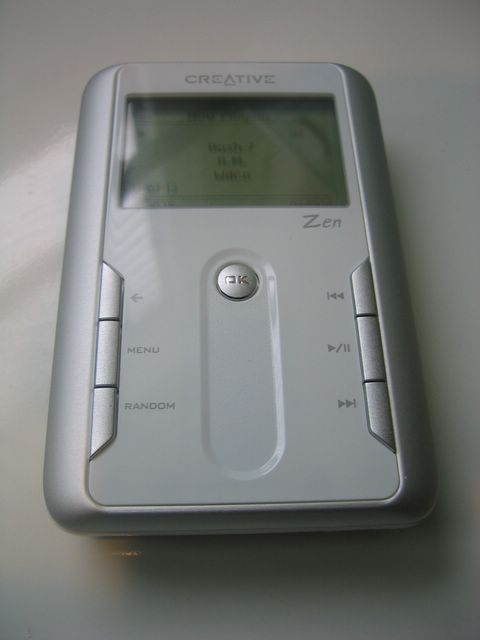
This is my new iPod Nano. For the past five or six years I have used a Creative Zen mp3 player which still serves me well but which is heavy and bulky by today's standards. It's hard to understand how they can make this thing so small, so wafer thin, yet able not only to store music but play films, shoot video clips, record voice memos, act as a calendar, alarm clock and general all-round indispensible gadget. I rather like it.
Since I began running two and a half years ago, I have run without music. This is partly preference because I do like to hear the ambient sounds but partly because my Zen doesn't respond well to the shaking and bouncing of a run as it operates from a traditional hard drive with all the attendant moving, spinning parts.
Apple has announced revised versions of their players and the new Nano will not be much bigger than a postage stamp. One unexpected sneeze and you might never see the device again! This week, before the fifth generation stocks dwindle, I treated myself to the old Nano and a slim neoprene sleeve with a Velcro armband.
Yesterday I ran with my new iPod for the first time and it was a nice experience. I ran sixteen and a half miles which took two hours and forty three minutes - long enough to listen to a playlist containing a one hour podcast on Jack the Ripper, two albums by "The Music" and a half hour BBC Radio programme, "Just a Minute." Time flew by!
from the mind of
Perfect Virgo
5
remarks
03 November 2009
Veho Muvi micro dv camcorder


I couldn't obtain this little rascal online in Canada and neither Amazon USA nor its resellers will ship the product outside the USA. I ended up ordering it from Amazon UK for delivery in the UK (as per their rules for electronics). My sister kindly repackaged it and forwarded it to me in Canada. So here it is, the latest in miniature digital video camcorders delivered to my door in a roundabout way!
I took the "Extreme Sports Pack" too, as it seemed to offer a good range of mounts and straps to secure the camera to almost anywhere. First impressions are good. It feels solid and surprisingly weighty for its startlingly small size. I also bought a Class Six Micro SD Card as I hear that the basic cards don't write data as smoothly, resulting in some reported jerkiness on playback. The card is so tiny it would be easily lost or blow away in a light breeze.
The three operating buttons are obvious and seem robust and there is a simple warning light system to indicate what the little devil is up to.
The Extreme Sports Pack duplicates the lanyard, pouch and crocodile clip provided with the main unit. Initially I found the tangle of straps, Velcro and plastic somewhat mystifying as there are no instructions. The thing I thought was a jockstrap is actually an armband and the various clips and Velcro bands are almost impossible to identify from the miniscule illustrations on the back of the box. I investigated online and found names for the parts, or at least descriptions.
The pack is worth having and you can probably cobble the bits together anyway you want to suit your peculiar needs. I plan to use the straps to secure the device to my cycle helmet and the armband to film my runs. The crocodile clip will attach the camera to my lapel or backpack strap for discreet filming in the library or wherever! A very useful item is the swivelling metal bracket which I discover is magnetic so you might temporarily fit the camera somewhere in a room for some candid scenes.
Perhaps I'll clip the camera over my rear view mirror and go for a drive around town now.
from the mind of
Perfect Virgo
4
remarks
06 May 2009
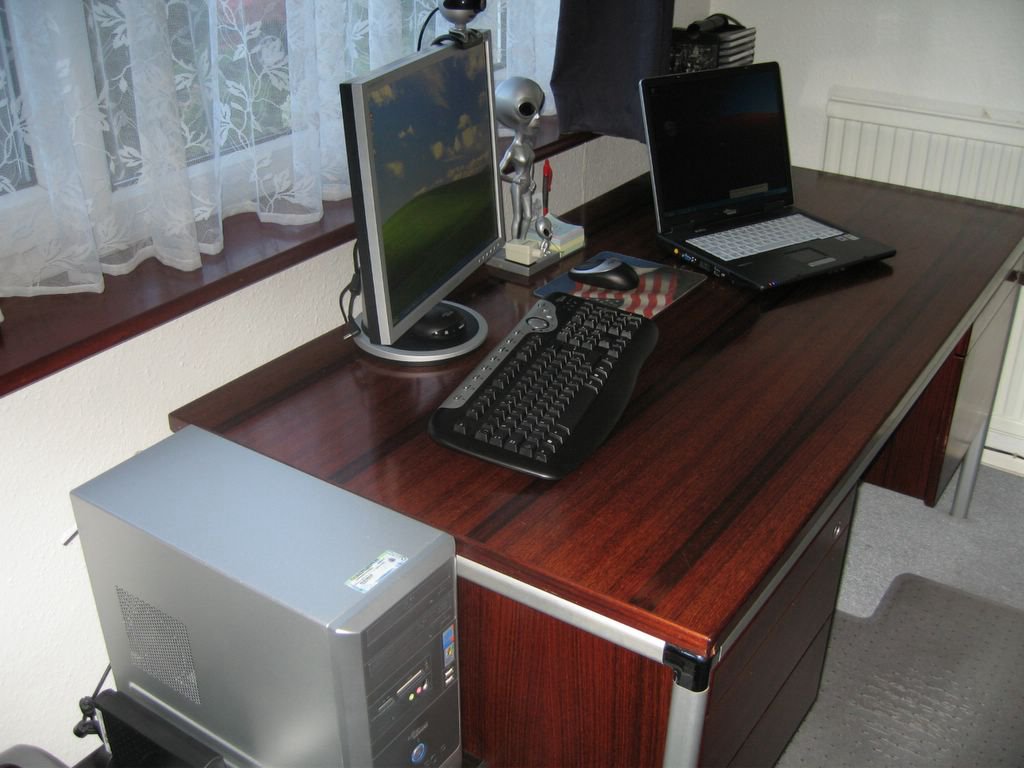
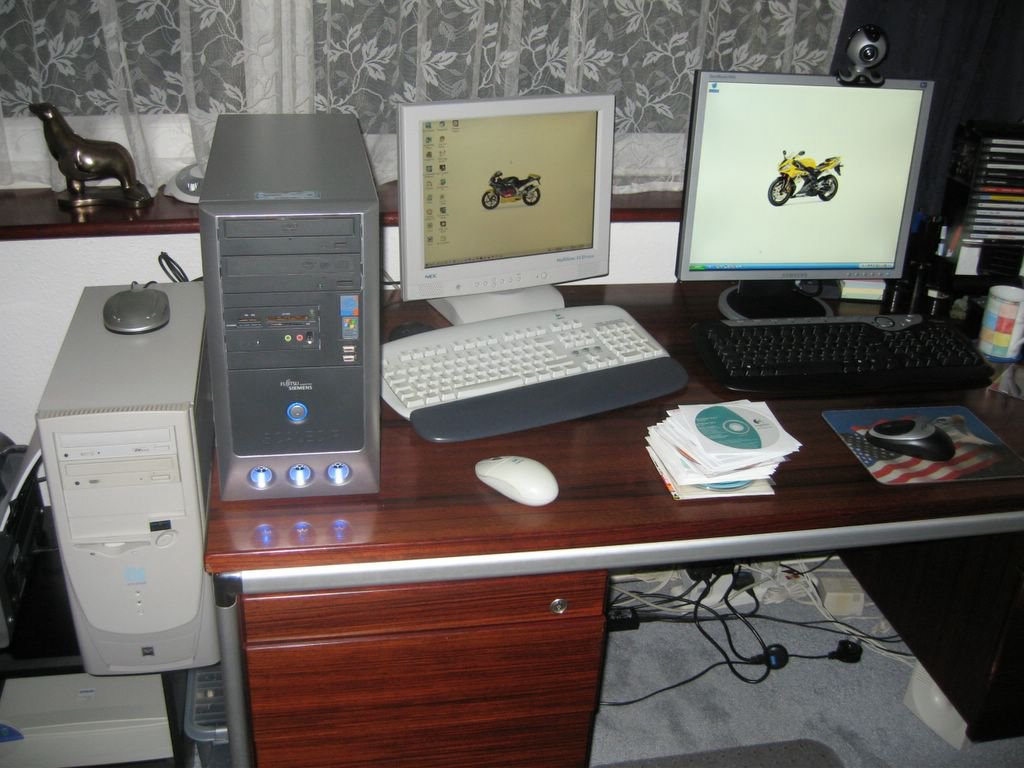
on my desk
from the mind of
Perfect Virgo
4
remarks
09 November 2005
Gadgets

Okay so you want gadgets? Here is the new setup-
Desktop and Laptop.
Fujitsu Siemens
Scaleo P desktop
3Ghz Pentium 4
200gb hard drive
1gb RAM
DVD-RW dual layer
DVD-ROM
TV tuner
Samsung 19” TFT
FS Cordless kb/mouse
Freecom 80gb USB hard drive
Creative 4.1 surroundsound
Logitech 4000 pro WebCam
Epson X620 printer/scanner
Canon Ixus 700 camera
Creative Zen Touch 20gb mp3 player
Fujitsu Siemens
Amilo Pro laptop
Pentium M740 1.7Ghz
60g hard drive
512mb RAM
DVD-RW dual layer
15” TFT
Belkin wireless broadband router
I’m already bored and researching a new motorcycle.
from the mind of
Perfect Virgo
20
remarks
04 November 2005
PC

These days I'm not good at concentrating on more than one thing at a time. I have a new PC and laptop and am running them beside my old PC while I transfer files, programmes and settings. I can't do that and write as well. The wires are untangled the systems all run smoothly and I am packing away the boxes. So normal sporadic service will be resumed as soon as can muster the enthusiasm.
from the mind of
Perfect Virgo
11
remarks